
Limited Time Offer

Days
Hours
Minutes
Seconds
:
:
:

Make Revit enjoyable by automating frustrating manual tasks with Grasshopper.

Make Revit fun again with the power of Grasshopper automation.

Give Revit Superpowers: Build custom tools to automate repetitive tasks, fix messy parameters, generate drawings in seconds, and connect Revit with the AEC tools you already use - without clumsy Dynamo or touching the scary Revit API.

Give Revit Superpowers: Automate tasks, fix messy data, create drawings fast, and connect to AEC tools. No Dynamo, no Revit API.

Starrrs

3200+ AEC professionals have rated our courses 4.76/5. You can be confident this training delivers results.

Hero image
Widget grt

3200+ AEC professionals have rated our courses 4.76/5. You can be confident this training delivers results.

Sounds like you?

Year after year, you’ve waited for Revit or Dynamo updates, hoping they’d finally fix your time-consuming manual tasks. Meanwhile…

Smileyxeyes

You spend hours on mind-numbing tasks: renumbering dozens of elements, updating sheets one by one, copying annotations, double-checking model data...

Icon

Projects are becoming increasingly complex, and deadlines are accelerating, but you’re stuck, wrestling with Revit’s limitations or clunky workarounds.

Icon1

You’re trying plugins and macros, but they never quite fit your needs.

Icon2

Revit API scares you, and writing your own code feels daunting (or simply not fun).

Is this what you’ve studied for?
Is this what a self-respecting designer should be occupied with?
Is this the way to fulfilling your potential and scaling up your career?

I think not.

But keep calm and watch the trailer.

The change is at your fingertips…

Shape2
Shape m2t

Join Grasshopper in Revit Training Your path to no-code automations and enjoyable work in Revit

Our new training, Grasshopper in Revit, is a highly practical program designed for Architects, Engineers, BIM professionals, and all other AEC experts willing to automate Revit using Grasshopper.

Bundle img

Once you’re in, you’ll get:

The training is based on our combined decades of hands-on experience with computational design. We’ve distilled knowledge, methods, and best practices from some of the world’s biggest AEC projects into a step-by-step, user-friendly program, and we can’t wait to share them with you!

What industry experts say about our training

Starss
Gavin Nichols

Gavin Nicholls
Aussie BIM Guru

“Kris is one of the most passionate and enthusiastic Grasshopper users I currently know, and I'm pleased to attest that this reflects in the quality and depth of his courses. If you're keen to get a grasp on all things Rhino/Grasshopper related, this is a great place to do so!"

Starss
Muhammad Abrar

Muhammad Abrar
Structural Computational Design Engineer

"The course has been fantastic, super clear, practical, and well structured. You can tell Junghwo is applying the logics into the main projects and not just teaching theory. I'm already applying these workflows in into my work. And it's just genuinely saving time. (...) Nothing feels like academic, but it's just the stuff that you can actually use immediately. (...) I would definitely recommend this course."

Starss
Japhy Walton

Japhy Walton
Application Specialist at Robert McNeel and Associates

"Another quality release from Kris, this time in collaboration with expert Rhino.Inside.Revit instructor Junghwo Park. Whether you're just starting out or ready to tackle advanced features, these tutorials will accelerate your learning curve significantly."

Bg shapeq1x ptp 01
Shape m1t 01

By the end of this training, you’ll know how to:

Build quality assurance tools img

Fix Parameters Once, Not Over and Over

Tired of messy parameters? Learn how to instantly get and set values across hundreds of Revit elements like walls, doors, rooms, and floors. Use Grasshopper to insert or update data such as fire ratings, type marks, comments, or area values based on rules or pulled straight from Excel. Save hours and keep your schedules clean without repetitive edits.

Automate Drawing Creation & Annotation

Manual drawing setup takes forever and often leads to mistakes. You’ll learn how to auto-generate views like floor plans and sections, place them on sheets, apply graphic filters, and even auto-tag elements. Your documentation will be fast, consistent, and easy to reproduce.

Automate drawing creation & annotation img
Automate repetitive tasks img

Build Quality Assurance and Coordination Tools

Keep your models clean, aligned, and clash-free. You’ll build scripts to run automated quality checks, spot missing parameters, detect misaligned elements across linked models, and find problematic geometry . You’ll also run fast collision-style checks between disciplines like MEP and Structure without exporting to Navisworks or struggling with heavy IFCs.

Connect Revit with the Tools You Already Use

Grasshopper becomes your bridge between Revit and hundreds AEC tools like Excel, Power BI, Speckle, and structural or environmental analysis software. Instead of exporting messy IFC, DWG, or SAF files, you’ll sync data directly and streamline collaboration across platforms.

Integrate revit with analysis img
Create advanced parametric geometry img

Create Complex Geometry and Families Faster

Model what Revit struggles with. You’ll learn how to generate façades, adaptive components, and custom panels as families or Direct Shapes, without needing the family editor. You’ll also script cleanup tasks to purge unused types, flip geometry, and pin key elements to keep your model light and clean.

Share Your Tools with the Team

Build clean, reusable Grasshopper scripts that anyone on your team can run directly inside Revit, even if they’ve never touched Grasshopper . You’ll getstep-by-step guidance to make your tools scalable, reliable, and team-friendly.

Share your custom tools with your team i
Engineer man
Engineer woman1

Who is this training for?

Shape m4t 01
Bg shape1c ptp 01

Join AEC Professionals

from 200+ companies

Logo client 11
Logo client 10
Logo client 9
Logo client 8
Logo client 7
Logo client 6
Logo client 5
Logo client 4
Skanskalogo
Logo client 2
Logo client 1
Sitowise 1
Stykka logo 01
Arup logo
Jacobs logo
Logo client 11
Logo client 10
Logo client 9
Logo client 8
Logo client 7
Logo client 6
Logo client 5
Afrylogo
Logo client 3
Logo client 2
Logo client 1
Sitowise 1
Stykka logo 01
Arup logo
Jacobs logo
Bg shapeq1x ptp 01
Shape m1t 01

Why not just learn on your own?

It’s a possibility. But it’s time-consuming and frustrating. We’ve been there, done that, and spent a gazillion hours cutting through the bushes of the internet jungle to occasionally find a nutritious portion of practical, relevant knowledge.

Take a look at the comparison below to see if self-learning is really the right path for you.

Self-learning
Learn Grasshopper
- guided training
Relevance
X
Overwhelming mass of resources dedicated to designers working on complex, organic geometries.
Check
Comprehensive all-in-one training with 100% focus on engineers and architects from the AEC industry.
Structure
X
Chaotic, disorganized way of aquiring knowledge.
Check
Proven step-by-step learning path based on a method used on the best technology universities.
Credibility
X
Doubtful credibility of the authors and the content itself.
Check
Accredited Rhino Trainer, practicioner with long-standing experience.
Practicality
X
Boring, heavily theoretical content.
Check
20:80 theory to practice ratio, more than 300 practical, gamified exercises based on real-life AEC projects.
Support
X
Loneliness in the face of a challenge.
Check
An engaged, closed community of students facing the same challenges, ready to brainstorm solutions together.
Self-learning
X
Overwhelming mass of resources dedicated to designers working on complex, organic geometries.
X
Chaotic, disorganized way of aquiring knowledge.
X
Doubtful credibility of the authors and the content itself.
X
Boring, heavily theoretical content.
X
Loneliness in the face of a challenge.
Grasshopper Fundamentals - guided learning
Check
Comprehensive all-in-one training with 100% focus on engineers and architects from the AEC industry.
Check
Proven step-by-step learning path based on a method used on the best technology universities.
Check
Accredited Rhino Trainer, practicioner with long-standing experience.
Check
20:80 theory to practice ratio, more than 300 practical, gamified exercises based on real-life AEC projects.
Check
An engaged, closed community of students facing the same challenges, ready to brainstorm solutions together.

It’s easy to get lost in the uncharted land of self-learning.

But hey, we’ve already traversed it and made a proper map!

So how about setting off on this journey together?

Meet Your Instructors

Kw1

Krzysztof Wojsław

Computational Engineer & Founder
of Learngrasshopper.com

Hi! I’m Kris, the founder of LearnGrasshopper.com and a computational engineer with 10+ years of experience in BIM and parametric modeling. As an Authorized Rhino Trainer, I have guided over 800 architects and engineers in their exploration of the computational design world.
I had worked on world-class engineering projects, and my drive and efforts towards industry transformation were recognized in the EFCA 2021 Future Leaders Competition, where I was titled Europe’s best engineer.

In this edition, I will be the instructor of Grasshopper Fundamentals Training.

Junghwo Park

VDC Manager & Revit Expert

Hello, I’m Junghwo. I’m a BIM specialist and Autodesk University speaker recognized for innovative Grasshopper&Revit workflows. I have many years of experience using Rhino.Inside Revit to bridge design and analysis. I’ve taught professionals across the globe, among others, as a McNeel Europe tutor.

I brought cutting-edge techniques and a practical engineering perspective to the Grasshopper in Revit training.

Jp1

With over 25 years of combined experience in AEC, Kris (Engineer) and Junghwo (Architect) make the perfect duo. They’ll guide you through the training with practical examples, real project workflows, and hard-earned lessons. You won’t waste time on trial and error — they’ve already made the mistakes so you can go straight to what works.

Join us

Stay connected and grow
with our community

Our program is made for you to learn at your own pace, whenever and wherever you want. But we are not leaving you to struggle with challenges on your own! In our private Discord community you will:

3345662a7a5e5ffb9e19988848cf4bc2
Bg shapeq1x ptp 01
Shape x1b1 01

Engineers and architects who completed the training say…

Starss
Diego Escalante review

Diego Escalante, Bridge Designer

"Just with some of the first videos that I watched I got exponentially better at my work in Revit as a Bridge Designer. Not only I can work more efficient and painless in my projects, but now I am getting involved in way more complex projects and carrying on a small R+D for the Rhino/Revit/Sofistik integration!"

Starss
Didier mwira

Didier Mwira , Civil Engineer

Starss
Tomasz stasiukiewicz

Tomasz Stasiukiewicz, Senior Geotechnical Engineer

Starss
Ignacy lozinski

Ignacy Lozinski, BIM Coordinator, founder at Becomebimcoordinator.com

"The step-by-step lessons gave me a clear workflow for various tasks: from scripting, filter across host and link models, running quick collision checks, batch editing parameters, and also push pull data with Excel inside Revit. This course is like a hundred percent easy recommendation for me."

Get a taste of what the training will be like

Take a look at our demo lessons to get a sneak peek at the type of content you can expect in the course.

Ready to level up your Revit workflows? Explore your options.

Revit

Advanced Grasshopper
in Revit Training

Revit product1

Who is it for?

Already a semi-advanced Grasshopper user, confident in data trees? This option is for you. Get full access to the Grasshopper in Revit training. We jump straight into Revit-focused workflows while still guiding you step-by-step.

What is included?

Grasshopper in Revit Training

100% Satisfaction Guarantee – 30-day refund, no questions asked

Ultimate Bundle

Grasshopper Fundamentals

& Grasshopper in Revit Training

Bundle img

Who is it for?

This is perfect if you’re new to Grasshopper or still missing confidence in more advanced Grasshopper operations. Start with the fundamentals to build your confidence in Grasshopper, then dive into the advanced Revit-specific training.

What is included?

100% Satisfaction Guarantee – 30-day refund, no questions asked

Bonuses

Intro to rhino
Ifc
Terrain modeling

Detailed Training Agenda

Grasshopper Fundamentals

00.00. Hello 07:16
00.01. About the course 10:46
00.02. About Author 04:43
00.03. How to work with materials 16:00
00.04. Discord Group 08:45
00.05. First Exercise 02:33

01.00 Intro 01:29
01.01 Why should engineers learn programming? 17:29
01.02. Computational thinking 15:50
01.03. Computer Programming 16:57
01.04. Parametric Design 12:45
01.05. Why Parametric Design? 15:15
01.06. What is Rhino and Grasshopper? 16:01
01.07 Grasshopper in Action 36:47
01.08 Summary 02:25

02.00. Installation process 20:03
02.01. Rhino Interface 1/2 30:25
02.02. Rhino Interface 2/2 18:15
02.03. Modelling in Rhino 1/2 32:06
02.04. Modelling in Rhino 2/2 28:43

03.00. Intro 02:13
03.01. Grasshopper interface 1/3 20:52
03.02. Grasshopper interface 2/3 14:24
03.03. Grasshopper interface 3/3 09:15
03.04. Rhino with Grasshopper 1/2 23:26
03.05. Rhino with Grasshopper 2/2 19:53
03.06. Intro Grasshopper - Homework 03:02

04.00. Intro 04:15
04.01. Grasshopper Parameters 1-2 23:21
04.02. Grasshopper Parameters 2-2 16:23
04.03. Wiring 11:01
04.04 Grasshopper Components 13:22

05.00 Data 05:56
05.01. List Creation 21:06
05.02. List Management 19:26
05.03. Working with lists 10:27
05.04. Logic 18:02
05.05. Mathematics 23:28

06.00 Intro 01:46
06.01. Points 27:18
06.02. Vector 32:00
06.03. Planes 28:24

07.00. Intro 01:38
07.01. Basic transformations 33:02
07.02. Advanced transformations 36:39
07.03. Homework 05:40

08.00. Data tree 01:44
08.01. Data tree structure 26:09
08.02. Data tree generation 25:55
08.03. Data tree matching 18:37
08.04. Data tree operations 35:44
08.05. Homework 01:47

09.00. Intro 19:13
09.01. Lines and polylines 20:48
09.02. Modify polylines 43:04
09.03. Curves division 19:12
09.04. Curve operations 34:49
09.05. Homework 06:06

10.00. Intro 11:37
10.01. Primitives 10:14
10.02. Free form 27:37
10.03. Analysis 21:34
10.04. Util 18:56
10.05. Homework 06:08

11.00. Intro 01:02
11.01. Text management 30:23
11.02. Display 36:28
11.03. Intersect 16:19
11.04. Diverse 20:18

12.01. Good habits while working with Grasshopper 39:59
12.02 How to create clean Grasshopper scripts 01:11:08
12.03. IFC Export from Rhino – VisualARQ 56:40
12.04. Revit to FEM software workflow 26:58
12.05. Extra exercises
12.06. Terrain in Grasshopper – Lands Design 59:05

13.00. Congratulations 02:43

Grasshopper in Revit

00.00. Welcome 05:06
00.01. About the course and program 13:06
00.02. About the Author 04:22
00.03. How to work with materials 02:32
00.04. Discord Group 06:59
00.05. First exercise 02:13

01.00. Intro 02:17
01.01. What is Rhino Inside Revit? 08:57
01.02. Revit Terminologies 02:26
01.03. Prerequisites 05:37
01.04. Download 03:33
01.05. Set-Up 03:56
01.06. Limitations 06:29
01.07. Grasshopper in Action 14:48

02.00. Intro 02:41
02.01. Selecting Revit Elements 01:01:40
02.02. Filtering Selections 17:06
02.50 Case studies 07:08

03.00. Intro 03:46
03.01. Creating the Project Framework 37:49
03.02. Creating Standard Revit Elements
03.02.00. Revit Origin (Project Location) 15:52
03.02.01. Datum Elements (Grid, Level, Reference Plane) 36:19
03.02.02. Site Objects 23:13
03.02.03. Architectural Elements 20:03
03.02.04. Structural Elements 17:15
03.02.05. Materials 20:09
03.02.06. Object Styles 20:43
03.02.07. Create Revit Component Family 16:24
03.02.08. Room, Space, and Area 26:19
03.02.09. Form 19:43
03.03. Creating Direct Shapes 13:52
03.04. Creating Other Components 01:07:02
03.05. Geometry from Revit Elements 58:30
03.50. Case studies 01:26:51

04.00. Intro 02:16
04.01. Modifying Elements (delete, duplicate, purge, pin, and flip elements) 46:20
04.02. Construct and Deconstruct Compound Structure 13:11
04.50. Case studies 10:17
05.00. Intro 02:22
05.01. Intro 18:16
05.02. Get and Set Element Parameters 05:37
05.50. Case Studies 07:41

06.00. Intro 02:23
06.01. Get and Set View 14:11
06.02. Working with Sheet Elements 13:01
06.03. View Filter and Graphic Settings 06:45
06.04. Sync Rhino and Revit Views 07:47
06.50. Case Studies 08:06

07.00. Intro 0:01:47
07.01. Detail Items 0:05:05
07.02. Dimensions 0:10:23
07.03. Spot Coordinate and Spot Elevation 0:06:43
07.04. Text and Symbols 0:09:31
07.05. Tags 0:06:27
07.50. Case Studies 0:09:23

08.01. FEM to Revit with Grasshopper 0:08:33
08.01.00. Karamba3D/ SOFiSTiK GH in Revit Intro 0:03:06
08.01.01. Karamba3D GH in Revit 0:14:56
08.01.02. SOFiSTiK GH in Revit 0:13:34
08.01.03. CSI SAFE GH in Revit 0:17:06
08.01.04. ETABS/SAP2000 GH in Revit 0:29:51
08.01.05. FEM Design GH in Revit 0:16:49
08.02. Speckle introduction 00:00
08.02.01. Intro to Speckle 0:13:58
08.02.02. Build objects in Grasshopper and publish to Speckle 0:30:50
08.02.03. Mapping geometry to Revit 0:22:37
08.02.04. Performance tips 0:28:32
08.02.05. Accessing Revit data in Grasshopper with Speckle 0:21:55
08.02.06. Power BI setup: install data connector and 3D visual 0:25:28
08.02.07. Material quantities & costs in Power BI 0:27:37
08.02.08. Visualize quantities 0:25:28
08.03. Dynamo vs Grasshopper 2:41:39
08.04. Tips and Further Developments 0:00
08.02.00 Troubleshoot for plugin/addin conflicts 00:00
08.02.01 Furture Developments 00:00

09.00 Certificate 02:09

See what others appreciate about the program!

Starss
Ted Kujipers

Ted Kujipers, Freelance Facade Engineer

"(...) it really bridged the gap between Revit and Rhino. Now I can automate assemblies, fuse, sheets, and modify elements, gets at parameters and much more. It really streamlined my workflow from a complex geometry to production drawings. The course is, informative, well structured and interactive."

Starss
Muhammad Abrar

Muhammad Abrar, Structural Computational Design Engineer

Starss
Diego Escalante review

Diego Escalante, Bridge Designer

Starss
Maksym Sham

Maksym Sham, Structural Engineer

"it is been an excellent experience so far. This training offers a great opportunity for anyone looking to explore parametric control and automation in Revit through Rhino.Inside Revit. (...) Junghwo and Kris have developed a practical program that makes complex topics clear and immediately applicable to your projects. I recommend this course to engineers who want to push Revit further and integrate a computational design into daily workflow."

Pick your training and start changing the way you work in Revit today.

Revit

Advanced Grasshopper
in Revit Training

Revit product1
Old price999

321 EUR

Includes:

Bonuses:

Ultimate Bundle

Grasshopper Fundamentals

& Grasshopper in Revit Training

Bundle img
Old price1998

567 EUR

Best value

Includes:

Bonuses:

They invested and do not regret!

Starss
Tomasz stasiukiewicz

Tomasz Stasiukiewicz, Senior Geotechnical Engineer

"Thanks to the training, my work has undoubtedly experienced a significant breakthrough. It is now possible to acquire architectural data from the Revit model, modify elements in coupled geotechnical structural analysis and generate documentation in a highly automated way, as well as create non-standard elements parametrically so that the effect of the analysis can be transferred to the Revit model and used by colleagues from other departments saving hours of work. (...) the course program is laid out in a very thoughtful way and the knowledge is introduced gradually creating a logical sequence. (...) Junghwo can't hide his experience and thanks to that he not only trains, but also inspires. I would recommend this course to anyone, especially people who in the automation of repetitive tasks see an opportunity to change their work styles from one focused on meeting deadlines to one that restores the engineering creativity."

Starss
Ted Kujipers

Ted Kujipers, Freelance Facede Engineer

Starss
Maksym Sham

Maksym Sham, Structural Engineer

Starss
Didier mwira

Didier Mwira , Civil Engineer

"This course is very clear and well-structured and full of practical examples. This course is helping me to understand how to connect properly Grasshopper and Revit to design complex shapes and to save time. So what I really appreciate in this program, it is how each concept is step by step explained and applied in many real-world cases. The authors are knowledgeable, engaging, and passionate about what they teach. I recommend this course to anyone who wanted to push their Revit skills to the next level."

You risk nothing!

30-day refund guarantee.

Badge

We want you to be 100% satisfied. If you don’t feel you’re getting the value you expected, just let us know within 30 days from purchase – we’ll refund your full tuition, no questions asked. The refund is prompt and unconditional.

Our goal is to ensure you have a great learning experience, period.

Bgx3
Shape m5t1 01
Days
Hours
Minutes
Seconds

The offer is limited to 300 licenses and valid until the 20th of November 2025.
If the limit is reached earlier, the offer will end ahead of schedule.

Note: This is THE BEST PRICE you will EVER see for these programs, and it will increase with each new edition.

Your turn.

Ready to begin your Grasshopper & Revit adventure?

Bgx4
Shape m6t

Of course, you can stay where you are and continue the old ways with Revit, while waiting for the next training edition. But meanwhile…

So - why wait?

Bg shape1c 01
Shape m4t 01

Join 3,200+ modern designers
in Learngrasshopper.com community

Image 2
Darren onyskiw
Konstantin krasnopjorov review
Khalid fekry
Michał bytomski review
Mohammed el amine chabani
Image 3
Roderick read
Hidayat karim review
Dharanidhar reddy review
3 anna
Guillermo varela review
Jarosław kowalczyk review
Hidayat karim
Ramy mostefa review
Salva lopez
Mohammed el amine chabani review

Frequently Asked Questions

Let’s specify what programming means in the context of our training. If we’re thinking of coding - e.g., using Revit API, C#, Python it’s NOT needed at all. If we’re talking about visual programming, there are two options:

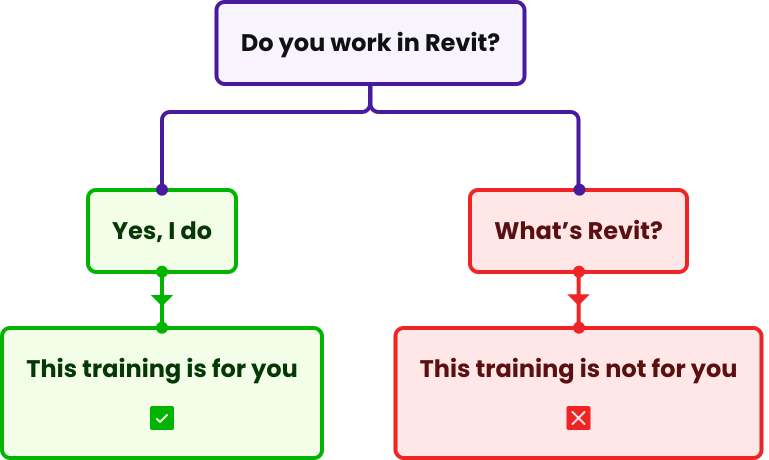
    If you’re completely new to Grasshopperand and decide to go for the bundle offer (Grasshopper Fundamentals training + Grasshopper in Revit training) you DON’T need to have any prior visual programming experience. Grasshopper Fundamentals training will give you solid foundations in Grasshopper and visual programming. Then, you will proceed to its application in Revit.

    If you want to start with Grasshopper in Revit training right away, you DO need prior experience in visual programming in Grasshopper. Otherwise, the training may turn out too advanced for you and leave you feeling disappointed and discouraged. With or without prior experience, you can succeed with our training! It’s just a matter of choosing the right learning path.

Definitely. This training goes beyond basics and dives into advanced, Revit-specific workflows that even experienced Grasshopper users likely haven’t explored. If you’re coming from Dynamo, you’ll learn a completely new (and more efficient) approach to achieving similar outcomes, plus entirely new capabilities (like leveraging Rhino’s geometry tools or the rich library of Grasshopper plugins). If you’re already familiar with Grasshopper in Rhino, this course will show you how to apply that knowledge within Revit’s environment, dealing with things like Revit parameters, elements, and interoperating with analysis tools. We also cover a ton of tips, best practices, and real-life case studies that will expand your skillset. Our past students with prior experience have told us they were amazed by how much they discovered in the training.

Dynamo is a useful tool, but it can feel limiting or slow for complex tasks. Grasshopper, on the other hand, offers greater flexibility, speed, and a vast ecosystem of plugins developed over 15+ years. By using Grasshopper via Rhino.Inside Revit, you get the best of both worlds: Revit’s BIM power and Grasshopper’s advanced automations, integrations, and more. Many users find that Grasshopper enables workflows that were impractical or impossible in Dynamo. Plus, Grasshopper’s visual programming interface and community support can make complex automation more accessible (and dare we say, more fun). In short, Grasshopper opens up new possibilities in Revit – allowing you to automate tedious processes and create parametric designs far beyond Dynamo’s usual reach.

Grasshopper in Revit is an 8-week online program, with flexibility to accommodate your schedule. Each week, a new module is released with video lessons, practical examples, and hands-on assignments. You can watch the pre-recorded lessons at your own pace (no need to quit your day job!). On average, we recommend dedicating 4-6 hours per week to keep up with the materials, but you can go faster or slower as needed. Well-done training is a completed training, regardless of how long it takes you. The course is highly practical with 20:80 theory to practice ratio – you’ll be applying new skills to sample projects (and your own projects) from week one.

In addition, we also host exclusive live workshops where you can ask questions, get feedback, and interact with instructors and fellow students in real time. If you can’t attend a live session, no worries – we record them so you can watch later.

If you start from Advanced Grasshopper in Revit training, you get one entire year of access to all the course content and the community. That includes all video lessons, downloadable resources (Grasshopper definitions, sample Revit files, etc.), and any new updates or additions we make in the future. You can re-watch lessons anytime and revisit the material whenever you need a refresher during the access period. If you go for the Bundle offer, you get lifetime access to the Grasshopper Fundamentals training and one-year access to the Grasshopper in Revit training.

Each year, there is a new version of Revit released, and RhinoInside.Revit is updated every week with many changes - new components, new workflows. Making sure that the content is up to date takes a lot of time and effort. Also, every month we organize webinars with Revit experts just for GRT students, and new, valuable materials frequently arrive in the training.

Meanwhile, Grasshopper is rather stable, and the content doesn’t require constant revisions.

The Revit course requires a lot more maintenance - hence the different approach.

If you buy the bundle, you will have lifetime access to Grasshopper Fundamentals training and community, and 1 year of access to Grasshopper in Revit training and community - which, of course, can be renewed when the access period ends.

You will need Autodesk Revit (we recommend version 2022 or newer) and Rhino 8 (or later). The connection between them is made possible by the Rhino.Inside Revit plugin (which is free to download), so if you already have Revit and a Rhino license, you’re ready to go.

Grasshopper comes built in with Rhino, so no separate install is needed. If you don’t currently own Rhino, you can use a 90-day free trial from McNeel to get started. We’ll provide guidance on setting up Rhino.Inside Revit in the first module – it’s straightforward, and our team can help if you hit any snags.

Any license issues - get in touch at kris@learngrasshopper.com, and let’s find a solution together.

Absolutely! When you join, you get access to our private online community on Discord where you can ask questions, share progress, and get help from fellow students. Both Kris and Junghwo - the training instructors - are also active in the group to support you. We foster a friendly, no-judgment atmosphere – no question is too basic. You’ll never be left alone; we’re here to make sure you succeed.

Yes – upon finishing the training, you will receive a signed digital certificate with a unique QR code that can be scanned by your employer or client to confirm the validity of your certification. Also, it takes only a few clicks to publish information about your achievement on LinkedIn directly from the last page of your training. More importantly, you’ll have a portfolio of script examples and results from the course that you can show off as proof of what you can do.

We want you to be 100% satisfied. Try the training risk-free: dive into the lessons and start building your scripts, and if you don’t feel you’re getting the value you expected, we offer a 30-day money-back guarantee. Just let us know via email within 30 days of purchase, and we’ll refund the full amount you paid, no questions asked. (Well, we might ask what we could do better, but you’re free to not answer. 😉)

Absolutely, we keep the training updated at all times, and you will automatically have access to all updates as they arrive for as long as you have active access to the training.

In theory, an online course could have an unlimited number of seats, but we value quality over quantity. It’s crucial for us to offer support to all the training participants if they need us, and the quality of our support would be difficult to maintain if too many students participated at the same time.

Here are a few examples of credible, quantified impacts AEC teams report when they add computational/BIM-driven automation (e.g., Grasshopper) to everyday work.

  1. Vendor implementations of Revit automation routinely report >90% time savings on repetitive documentation tasks (sheet/view creation, legends, schedules) when custom add-ins or scripts replace manual steps. (Source: Diroots, case studies)
  2. Across the industry, 48% of all rework is tied to poor data/miscommunication; better data flows/automation directly target this loss. (US 2018 = $31.3B rework.) (Sources: Plangrid, Autodesk)
  3. Companies themselves are calling out the need for both tools and talent: in Autodesk’s report, 79% of leaders say future growth depends on digital tools, and two-thirds of firms struggle to find people with the right skills — learning automation materially increases your employability. (Source: Autodesk)

Yes, you can pay in 3 installments. You can choose to do so by clicking the relevant button upon sign-up or inside the cart. Note: payment in installments is only available via credit/debit card. In case of issues, contact me at kris@learngrasshopper.com.

Of course, just fill out the required information in the checkout - you will get the invoice by email.

Investing in automation skills benefits not just you, but also your company. You’ll be able to save your team hundreds of hours and reduce errors on projects – that’s real money saved for your firm. Many employers are happy to cover training costs when they see the business case. We’ve prepared a one-page brief you can hand to your manager, outlining the ROI of the Grasshopper in Revit training. If you need help communicating the value, reach out to us – we’re happy to provide guidance or talk to the decision-maker at your company. CLICK HERE to view or download the brief.

Everything clear?

Hit the button
below and enroll!

Ellipse 8
Still have questions?

Contact me!

© 2025. All rights reserved. Learn Grasshopper
Designed by monsteramedia.pl

REVIT® and all other Autodesk software products mentioned on this website are registered trademarks of Autodesk, Inc., and/or its subsidiaries, and/or affiliates in the USA and/or other countries. This website is independent of Autodesk, Inc., and is not affiliated with, authorized, endorsed, sponsored, or otherwise approved by Autodesk, Inc.

Ellipse 8

Hi, it is Kris!

Still have questions after the FAQ?

Write to me.